Free focus app for iPhone

Body doubling that gets you to actually start

EarlyBird is a free body doubling app. You join a live focus room where other people are already working, say what you are going to finish, and your distracting apps stay locked until the timer runs out.

4.8 on the App Store

Free to download No account needed to start iPhone, iOS 18.2+

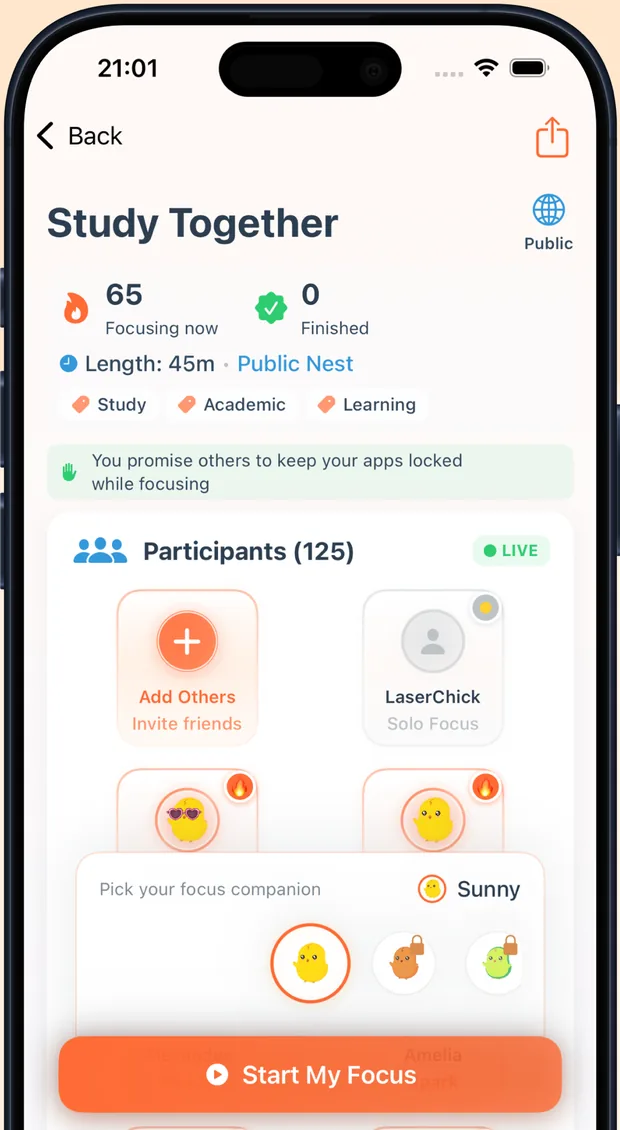
The EarlyBird Study Together screen on an iPhone, showing 65 people focusing now, a 45 minute session and a list of participants

Why willpower keeps losing

You already know what to do. You just cannot start.

The work is rarely the hard part. The hard part is the twenty minutes before it, where you tell yourself you will begin after one more video. Nothing about a to-do list fixes that, because the problem is not information. It is being alone in a room with a phone that was designed by people who are very good at their jobs.

EarlyBird changes the room instead of asking you to try harder. Other people working, a finish line you can see, and the apps that usually win taken off the table for the next 45 minutes.

How it works

Three steps, about two minutes

There is no setup wizard and no onboarding survey. You can be in a live session before you have time to talk yourself out of it.

  1. A live EarlyBird focus room with 125 participants and a Start My Focus button

    Join a room that is already running

    Open the app and drop into a public room, or start your own. You can see how many people are focusing right now and what they are working on. That is the body doubling part, and it is what makes starting feel possible.

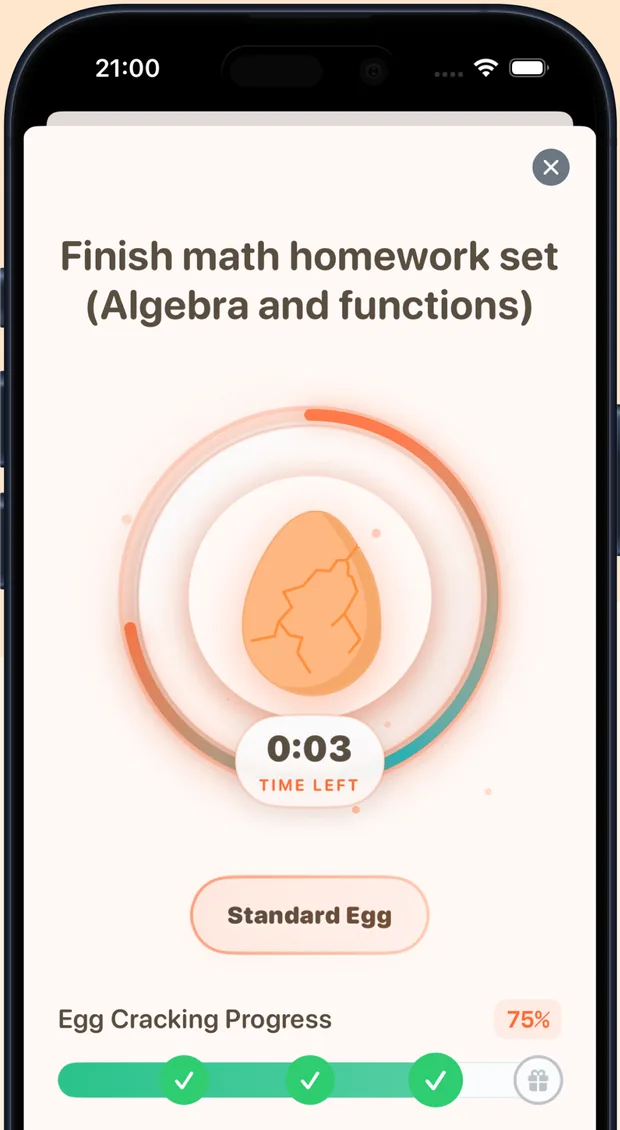
  2. An EarlyBird focus session in progress with an egg cracking as the timer counts down

    Name the thing and set the timer

    Write the one task you are going to finish, pick a session length, and choose which apps get blocked. Classic Pomodoro if you like it, your own lengths if you do not.

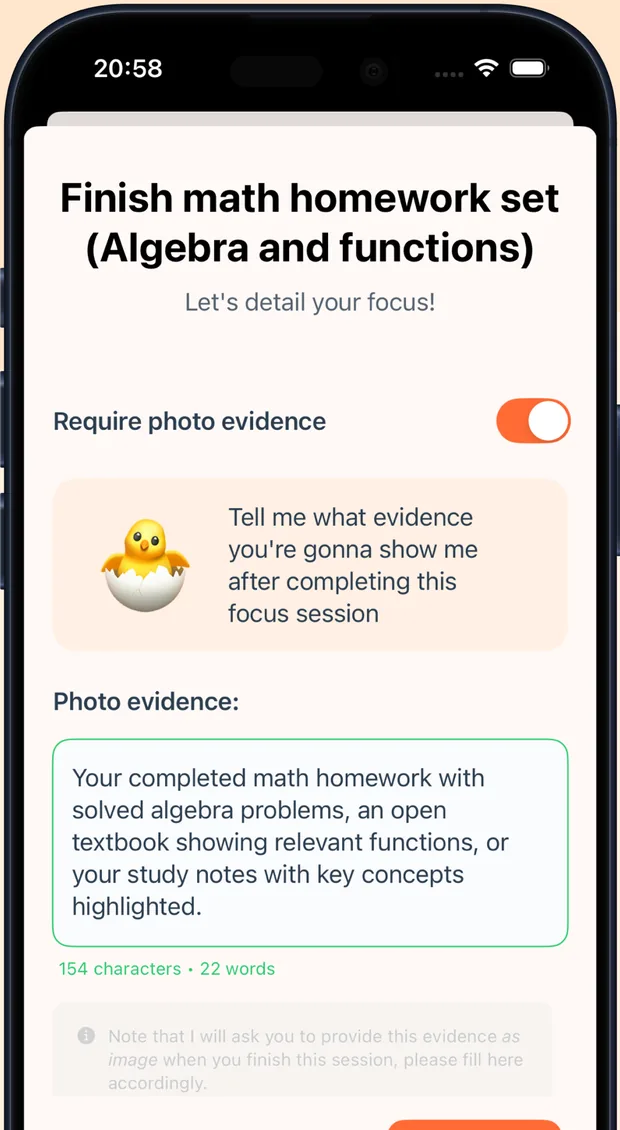
  3. EarlyBird asking what photo evidence you will show at the end of the focus session

    Work, then prove you did

    Your blocked apps stay locked for the full session. At the end you check in, with a photo if you turned that on, and the session goes into your stats and your streak.

What is in the app

A study room, an app blocker and a timer that talk to each other

Most people end up running three separate apps for this and abandoning all of them by week two. EarlyBird is the three in one place, which is the only reason the habit sticks.

Live focus rooms, no video and no small talk

Join a public room at any hour and you are working alongside other people instead of alone. You can see who is in the room, what they are working on and how long they have left. Nobody speaks, nobody appears on camera, nobody is watching you. The accompaniment is the whole feature.

  • Public rooms running around the clock
  • Private rooms for friends, a study group or a colleague
  • Shared goals at the start, check-ins at the end
EarlyBird Study Together room showing participants, session length and focus tags

App blocking that does not let you wriggle out

Pick the apps that usually steal the session and they stay blocked for its whole length. It runs on Apple's Screen Time permissions, so the block holds at the system level rather than depending on you being strong in the moment. Breaks are still yours to take. They just have to be on purpose.

  • Choose exactly which apps get blocked per session
  • Holds for the whole session, not until you tap dismiss
  • Intentional breaks stay available
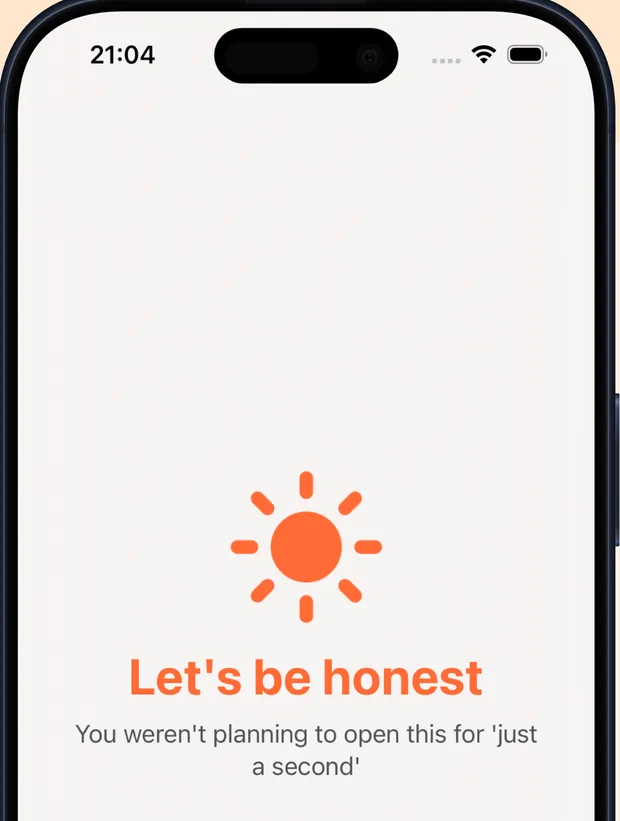
EarlyBird blocking screen reading Let's be honest, you weren't planning to open this for just a second

A focus timer you can actually shape

Run 25 and 5 if Pomodoro works for you, or set the work and break lengths that match how you actually concentrate. Tag sessions by subject, client or project and you get an honest picture of where your deep work went today, this week and this month.

  • Pomodoro or fully custom session lengths
  • Tag by subject, client or project
  • Daily, weekly and monthly focus totals
EarlyBird session timer with an egg cracking progress ring

Streaks and chicks instead of a telling off

Every finished deep work session hatches a chick for your collection, and your streak counts the days you showed up. It is light on purpose. Guilt has never once made anyone open their textbook, and a progress bar you are quietly proud of does more work than a notification that scolds you.

  • Daily and weekly streaks
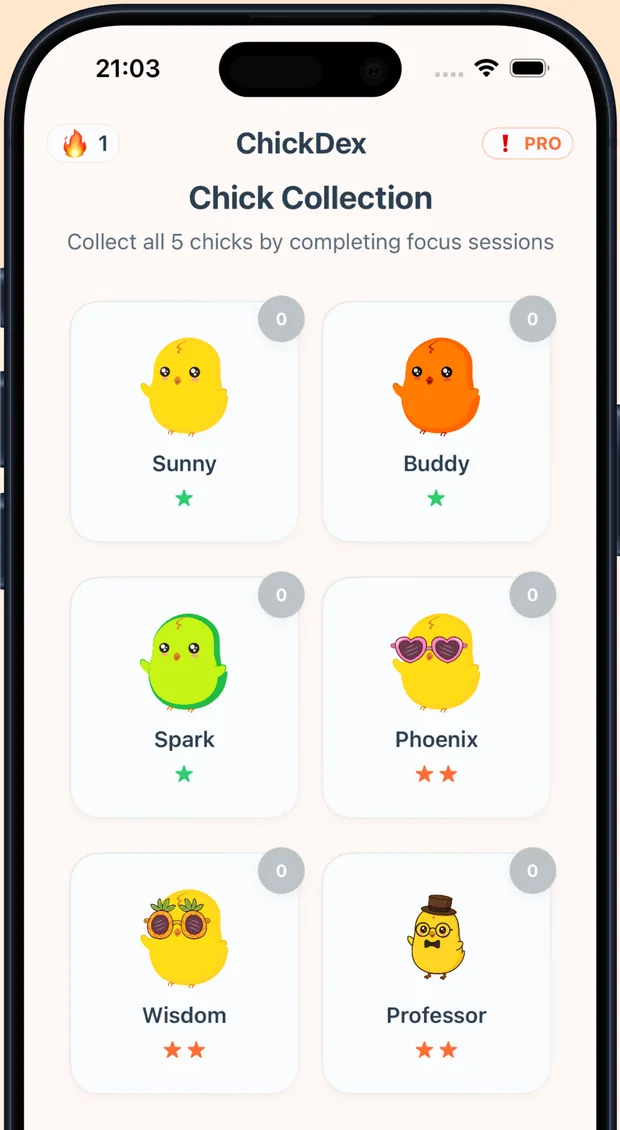
  • A chick collection you fill by finishing sessions
  • Session history you can look back at
The EarlyBird ChickDex collection screen with chicks named Sunny, Buddy, Spark, Phoenix, Wisdom and Professor

Where it fits

How EarlyBird compares to the usual setup

Most people trying to fix their focus are running a timer app and a blocker app and getting the benefit of neither. Here is what each part actually does.

Feature comparison: EarlyBird against the two tools it usually replaces.
What you get EarlyBird A plain Pomodoro timer A standalone app blocker
Other people working alongside you Yes, live roomsNoNo
Blocks distracting apps mid-session YesNoYes
Custom and Pomodoro session lengths YesUsuallyNot really
Proof you finished what you said Yes, photo check-inNoNo
Works with friends in a private room YesNoNo
Focus stats by subject or project YesSometimesScreen time only
Price to get started FreeVariesVaries

When focus keeps failing

Can't focus when studying? You are not missing willpower.

Every guide on how to concentrate on studies opens with advice you have already tried. Sleep more, drink water, make a timetable. None of it reaches 11pm on a Tuesday, when you need to study but can't concentrate and the phone is face down two inches from your hand.

EarlyBird is an app to concentrate on studies by changing the conditions rather than your character: other people already working in a live room, one task written down before you start, and your worst apps locked until the timer ends.

Losing focus while studying is usually a starting problem

The middle of a session is rarely where it falls apart. You can survive losing concentration while studying for a minute, come back, carry on. What ruins the evening is the hour before you begin, the one where you decide you will start at half past, then at the top of the hour, then tomorrow. If you can't focus to study at all, that gap is the thing to fix first, and no amount of highlighting fixes it.

Why you keep losing focus and concentration in the same room

Your desk has a history. It is where you last scrolled for forty minutes, so the room itself is a cue. That is why people who say they can't focus studying at home will get four hours done in a library without trying any harder. Their discipline did not change. The company did.

Nobody can concentrate in your studies for you. But someone visibly working two seats away makes the first ten minutes almost automatic, and the first ten minutes are the whole fight. Most people can concentrate in studies for about twenty minutes before the pull starts, which is roughly why short sessions with a visible end beat an open-ended evening.

The best way to concentrate while studying is to make starting cheap

Ask ten people the best way to focus on studies and nine will describe a system: colour-coded notes, a revision plan, another flashcard app. Systems help once you are working. They do nothing at the point of failure. The best way to concentrate on studies is to delete the decision, which means a fixed length, a named task, and somebody else already in the room when you arrive.

The best way to focus on study sessions you keep abandoning is to stop starting them alone. That is the entire design here, and it is why the app looks so thin next to the productivity tools you have already abandoned.

Concentrate on one thing at a time, and write it down

Before the timer runs you type the single thing you are going to finish. Not a list. One line. People who concentrate on one thing at a time get further than people running four tabs of intention, and writing it down gives the session a definition of done. It also makes it obvious at the end whether you did it. Concentrate your study into fewer, denser blocks and the weekly total goes up even though the hours at the desk go down.

If you want to concentrate more on studies this month than last, the lever is not effort. It is how many times you managed to begin. The app exists to make beginning boring.

The sentences people type at midnight

The searches that bring people to this page are all one sentence wearing different clothes: can't focus on study, no concentration in studies, not getting concentration on studies, concentrate mind in study, mind how to concentrate on studies, I want to focus on my studies, need help focusing on studying. The grammar varies. The problem underneath does not. You are alone with a device that is better at holding attention than your textbook is, and you are expected to win that with intent alone.

What actually helps is unglamorous. To get concentration in studies you need fewer options, a visible end and company, in that order. People who could not get concentration on studies with a plain countdown tend to stay with this one because two of those three are missing from a countdown.

There is no trick here for memory learning and improving concentration in a weekend. Better concentration for studying comes from repeating a decent session often enough that starting stops being a negotiation. Staying focused while studying is a side effect of that, not a skill you acquire first.

Improving focus with ADHD

Body doubling came out of the ADHD community long before anyone built software for it, which is why EarlyBird works as a body doubling ADHD app without pretending to be treatment. The searches are blunt about it: improve focus adhd, increase focus adhd. What sits behind them is usually a task that has been moved to tomorrow eleven times.

Staying focused with ADHD is less about the hour of work than the ten minutes before it. People looking for natural focus for ADHD, meaning something that changes the environment instead of the person, generally get on with body doubling faster than with another planner. EarlyBird is a productivity app, not a medical device.

There is a longer piece on this: body doubling for ADHD, covering what a body double is, the four points where a session usually falls apart, and what the app can honestly claim.

Timer and tracking

A study timer app that counts the hours you actually did

Most apps that help you concentrate while studying do one job and hand you a number at the end. EarlyBird runs the timer, holds the block and logs the session, so the hours in your stats are hours you were genuinely in.

Search for the best study timer app and you will scroll past two hundred versions of a countdown. They are fine. The countdown is not the part that fails. What fails is the twelve minutes in the middle where you check one thing, and no timer has an opinion about that.

EarlyBird is a free study timer app first. Run 25 and 5 if Pomodoro suits you, or set your own lengths if 25 minutes is not enough to get anywhere. The session ring stays on your lock screen while it runs, so you get a big timer for studying rather than a number buried three taps deep. There is no Android version yet, so it is a study timer app iPhone only, on iOS 18.2 or later.

The tracking side is the part people keep. Every finished session is logged with its tag, so it doubles as an app to track study hours by subject, client or project. If you have ever wanted an app to count study hours honestly, rather than one where you tap start and go to lunch, the app block is what makes the number mean something. Tag a session Chemistry and the week adds itself up, which is what most people mean when they ask for an app to keep track of study hours or an app to track study time instead of tasks.

Choosing between a study timer and a study tracker

Lists of the best study tracker apps split into two kinds. One is a timer with a nice ring; the other is a log you fill in afterwards. A timer is easy to ignore and a log is easy to lie to. EarlyBird sits in between: the timer opens the session, the block holds it, and the log fills itself in, which is the only reason the totals stay honest.

If you are shortlisting the best app to track study time, the useful question is not which one draws the prettiest chart. It is which one you will still be running in three weeks. The same goes for the best app to track study hours across a term, or the best app for study tracking generally. Accuracy comes from the session being hard to fake.

  • If you only want a timer

    People shortlisting the best app for study timer features usually want three things: custom lengths, something that survives the screen locking, and a total at the end. That is the default here. The best timer for study is the one you never have to set up twice.

  • If you want the hours counted

    Every session lands in your history, so it works as a track study hours app with no manual entry. As a track study time app it splits totals by tag, and unlike apps that track your study time on trust, the block means the count reflects real work.

    That is the gap between a nice chart and the best app for tracking study time, and the reason it holds up as a best study time tracker app over a full term.

  • If you work rather than study

    Freelancers use the same screen as a client timer. Most productivity timer apps stop at the countdown. This one adds the room and the block, which is why people who came looking for the best app for focus time at work end up leaving it running all day.

  • If you want the habit, not the stats

    Productive study apps usually die in week two because they need maintaining. There is nothing to maintain here. Among apps for productive studying, the ones that survive are the ones you open on your worst day, which is the honest test for any of the best study productivity apps you will find in a roundup.

    Apps to increase study productivity mostly measure. Changing the conditions is what moves the number, so judge the best apps that boost your work and study productivity on whether you still have them in a month.

App blocking

A distraction blocker that holds for the whole session

A distraction blocker is only worth having if it survives the moment you want to get around it. On iPhone that means Apple's Screen Time permissions, which is what EarlyBird uses, so iOS enforces the block instead of a polite reminder.

Pick the apps that usually take the evening. Instagram, TikTok, the group chat, whatever yours are. They stay locked until the timer ends. It is an anti distraction app in the strict sense: while the session runs, the app that blocks other apps while studying is holding the door, not you.

Search the best anti distraction apps and you get two kinds, ones that nag and ones that block. The nagging ones are lovely and they lose. Because this runs at system level you block distracting apps iPhone-wide for the length of a session, then get them back the second it ends. As an iPhone distraction blocker it needs iOS 18.2 or later, since the Screen Time framework does the enforcing.

The blocking is in the free tier, which is rarer than it sounds. Most free distraction blocking apps hold the actual blocking back for the paid plan, so you end up with a free distraction blocker that mostly sends notifications.

What gets blocked, and when

The list is yours and it resets every session. An app to prevent distractions during revision does not need to be a permanent ban on your camera roll, so nothing carries over unless you want it to. Apps that prevent distraction with one blanket rule get deleted within a fortnight, usually on a day you had a good reason.

For revision, the setup people settle on is an app to stop distractions while studying and nothing more: two or three social apps blocked, everything else untouched. You do not need the full lockdown. Most apps to stop distractions fail by being too aggressive on day one.

If you are comparing the best distraction blocking apps, or a roundup of the best apps to block distractions, two questions decide it. Does the block survive a determined swipe, and is anything enforced by the operating system rather than by the app asking nicely? Plenty of distraction blockers fail both.

The honest answer about the best distraction blocker is that it is whichever one is attached to a session you already agreed to start. A blocker on its own is a punishment. A blocker wrapped around 45 minutes in a room with other people in it is just the conditions changing, which is why the best apps to stop distractions are the ones that hand you something to do instead. People search for a stay focused app block, an app lock distraction setting, or simply something that will hold the line for an hour. Same request, three phrasings.

The full breakdown lives here: the distraction blocker for iPhone, including how it compares with Screen Time limits and Focus mode, and why a blocker on its own tends to stop working by week two.

Accountability and study rooms

An accountability partner app you do not have to schedule

The trouble with a human accountability partner is logistics. Yours has a job, a timetable and their own bad week. A room that is already running needs no arranging.

EarlyBird is an accountability partner app free of charge for the part that matters: joining a live room and running a session. Nobody has to be found, no time has to be agreed, and there is nothing to cancel. As an accountability buddy app it is deliberately low ceremony. You are not assigned a person, you are given a room with people in it.

Teams sometimes ask about accountability partner software, meaning dashboards and check-in reports for a whole department. This is not that. It is a room, a timer and a photo at the end, which is the version that individuals actually keep using.

If you already have someone, make a private room. Most apps for accountability partners assume you both remember; here the room is the reminder and you can see when they are in it. That makes it a partner accountability app that survives the fortnight your partner goes quiet, because the public rooms are still full. Asked which is the best app for accountability partner arrangements, the answer depends on whether you want a scoreboard or company. This one is company, with a small amount of proof at the end.

Study together, at whatever hour you are awake

As an app to study together with friends or strangers, the rooms run around the clock. Someone in another timezone is always mid-session, including at the hours when your own group chat has gone dark.

Apps for studying together usually mean video calls, which turn into a different activity: you talk. There is no camera here and no microphone. A study together app should make you feel accompanied and then get out of the way.

It covers what people want from virtual study with me videos, minus the video. A virtual study session here is other real people working now, their own timers visible, which is closer to real time study with me than a four hour recording of somebody else's desk from 2021. If you normally get study with me clips going on YouTube for company, this is the same instinct with the hours attached.

For a group, a private room is the least fussy way to study online together: no meeting link, no camera, everyone's timer visible. It will not win a list of the best group study online tools on features, because there are hardly any features, and that is rather the point.

More on how the rooms work: studying with friends and virtual study rooms, including private versus public rooms and how a room compares with a video call or a study with me video.

Who uses it

Made for people who lose the first hour every time

  • Students and exam revision

    A study room you can open at 11pm when the library is shut and nobody in your group chat is awake. Tag sessions by subject and watch the hours add up before the exam.

  • People with ADHD

    Body doubling, short sessions and a visible finish line, without a system that needs maintaining. No diagnosis required, and no lecture when you miss a day.

  • Remote workers and freelancers

    The part of the office you actually miss is other people quietly working nearby. Private rooms give you that back, plus billable time tracked by client.

  • Writers and researchers

    A thesis, a dissertation or a first draft is mostly a starting problem. Long custom sessions and a hard block on the internet's opinions help more than another outline.

From the App Store

What people say after a week

Rated 4.8 out of 5 on the App Store. These are real reviews, quoted as written.

★★★★★

Finally a focus app that makes body doubling work

"I've tried so many focus timer and Pomodoro apps but this is the first one that actually keeps me accountable. The body doubling feature and study rooms make a huge difference. Focusing with a friend instead of alone helps me stay consistent, especially with ADHD."
alexanddru, App Store review

★★★★★

Actually got me to stop scrolling and study

"I've tried like 5 focus apps and kept going back to just using my phone anyway. EarlyBird is the first one where the app blocking actually works, it doesn't let you wiggle out. The photo proof at the end is annoying in the best way. My screen time dropped like 2 hours in the first week."
Aslus01, App Store review

★★★★★

Helpful to find people to study together

"Really helpful app if you struggle with ADHD and staying organised. The account partnership feature genuinely makes things easier to manage and helps with accountability without feeling overwhelming."
Tahas1, App Store review

Questions

Frequently asked questions

What is EarlyBird?

EarlyBird is a free body doubling app for iPhone, made by independent developer Umut Acerbatimur. You join a live focus room where other people are already working, state what you are going to finish, and your distracting apps stay blocked until the session timer ends. It puts a study timer, an app blocker and virtual study rooms in one app.

What is body doubling and why does it work?

Body doubling means doing your work in the presence of someone else who is also working. The other person does not help with the task. Their presence is the point.

It works because starting, not the work, is usually the hard part. When someone else is visibly working, your brain stops negotiating and begins. It is a long-standing strategy in the ADHD community, and it is the reason a library or a busy cafe feels easier to work in than an empty room.

Is EarlyBird free?

Yes. EarlyBird is free to download, and you can join focus rooms and run sessions without paying. EarlyBird Premium unlocks unlimited sessions and full statistics for $2.99 per week or $3.99 per month.

Does EarlyBird actually block apps?

Yes. You choose which apps get blocked before a session starts and they stay blocked for its whole length. It uses Apple's Screen Time permissions, so the block holds at the system level rather than relying on you resisting the urge. You can still take a planned break. You just cannot casually reopen Instagram halfway through.

Is EarlyBird good for ADHD?

EarlyBird is built around three things ADHD brains tend to respond to: short sessions with a visible finish line, other people in the room so you are not starting alone, and a change of environment rather than a demand for more willpower. You do not need a diagnosis to use it.

EarlyBird is a productivity tool. It is not a medical device, a treatment or a substitute for professional support.

Do I have to talk or turn my camera on?

No. There is no video and no small talk. You see who is in the room, what they are working on and how long they have left. That is the entire social layer, and it is deliberate. The point is to feel accompanied, not watched.

Can I use it with friends instead of strangers?

Yes. Create a private room and invite friends, a study group or a colleague, so it works as a scheduled study session or a standing accountability partner slot. Public rooms are there for when nobody you know is free.

Is EarlyBird available on Android?

Not yet. EarlyBird is iPhone only and needs iOS 18.2 or later, because the app blocking is built on Apple's Screen Time framework.

How is it different from a normal Pomodoro timer?

A Pomodoro timer counts down. It does not stop you opening TikTok and it does not care whether you started. EarlyBird adds the two parts a timer is missing: other people working alongside you in a live room, and an app block that holds for the length of the session. The timer is still there, and you can run classic Pomodoro or your own lengths.

What is the photo proof for?

Before a session you write down what evidence you will show when the timer ends, for example finished problem sets or a page count. At the end you check in with a photo. It is optional, and it exists because saying what you will produce in advance is much harder to quietly wriggle out of than a private intention.

I want to study but can't concentrate. Where do I start?

With one 25 minute session tonight, not a new system. Join a room that is already running, write down the single thing you will finish, block the two apps that usually take the evening, and stop when the timer does.

Being told to just focus on your studies is useless advice, because attention is not a switch you forgot to flick. Making the first block small enough that refusing it feels silly is what gets you to concentrate on your studies at all, and the second session is always easier than the first.

Which are the best apps to concentrate while studying?

The category is crowded and most of it is the same countdown in different colours. If you already start sessions reliably, a plain timer is enough and you should not pay for anything. If starting is the part that fails, you want other people in the room and a block that iOS enforces, which is the gap EarlyBird was built to fill.

Does it work as a study tracker as well as a timer?

Yes. Every finished session is logged with its tag, so you get daily, weekly and monthly totals by subject, client or project without typing anything in afterwards. Because your apps are blocked while the timer runs, the totals are closer to real focused hours than a log you fill in from memory on Sunday night.

How is this different from a study with me video?

A study with me video is one person's desk, recorded once, playing at you. An EarlyBird room is people working at the same time as you, with their own timers running and their own tasks written down, and it logs your hours while you are in it. No camera, no microphone, nobody performing.

Get started

Your next session can start in about two minutes

Free to download, free to join a room, no account needed to run your first session. iPhone, iOS 18.2 or later.

QR code that opens the EarlyBird download page on your phone

On a laptop? Point your phone's camera at this and the App Store page opens on the device you will actually use it on.

Download EarlyBird free